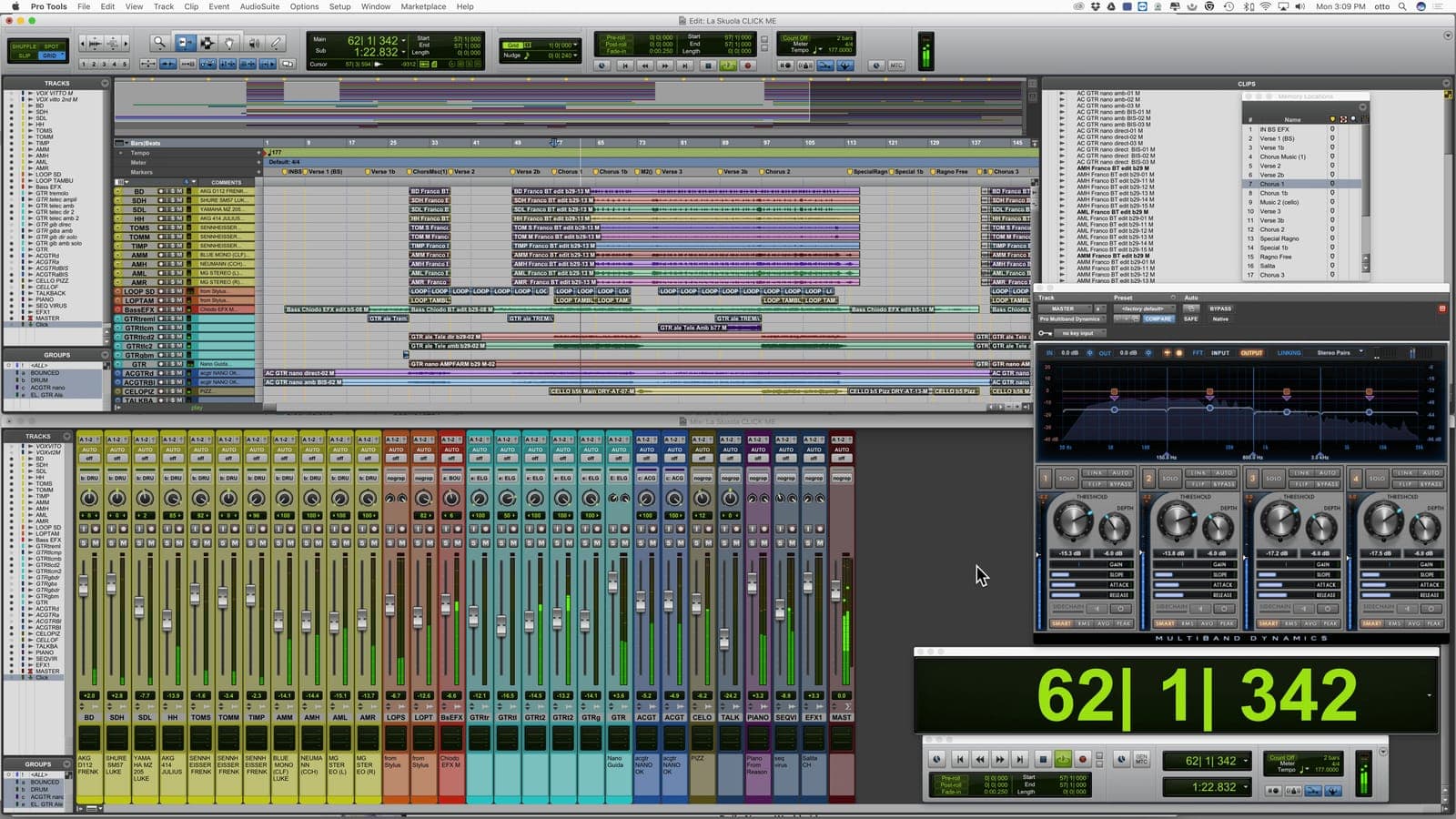
Our Pro Tools course provides in-depth training for recording and producing music in the engineers choice, and recording & mixing studio standard DAW. It doesn’t matter what genre the music you work with is, if you want to use Pro Tools to create your tracks, this course will cover the music production and engineering skills you need. Even if you are a more experienced Pro Tools user you will benefit from this course, as all of the elements will be covered in detail, peppered with loads of practical real-world tips – giving you the edge over anyone learning any other way. Total class time is 36 hours where you can ask a question and bounce off of your instructor and fellow learners exactly when you're feeling inspired, or …confused! This is why some say that there is no substitute for music production courses in person. On successful completion of the course, you will receive an industry-recognized certificate.
Pro Tools Class | Portland
Pro Tools Course
Getting Started
- →Software installation, toolkits, iLoks & licenses
- →Avid hardware and other compatible interfaces
- →Launching Pro Tools & session start up
- →File format, bit depth & sampling rate tips
- →Pro Tools file structure and file management
- →Edit & mix window introductions
Advanced Editing Techniques
- →Clip based gain and automation
- →Pencil tool, TCE (Time Compression Expansion Tool)
- →Strip silence and tab to transient and consolidating clips
- →Repeating and duplicating clips
- →MONO, stereo and panning
- →Overview and automation for plugins and effects
Workflow
- →Edit window orientation
- →Importing audio, creating and track arranging tips
- →Edit modes - all about Slip, Spot, Shuffle & Grid
- →Multi-tool (Trimmer, Grabber, Selector)
- →Transport window - tempo, pre & post roll count off
- →Grid and nudge values
Recording Techniques and Introduction to Sound Design
- →Balancing, introduction to the art of mixing. Group tracks and advanced uses of routing
- →Introduction to sound waves, frequency, and amplitude
- →The recording patch in detail, introduction to gain structure
- →EQ and compression for recording
- →Foldback, headphone mixes, and latency
- →Digital, analog, sampling rate and bit-rate explained
- →Microphones overview and stereo miking techniques
- →Recording specific aspects of Ableton
- →Compiling audio takes
Samples & Loops
- →Creating drum loops in Pro Tools
- →MIDI controllers and editing MIDI
- →Printing software Instruments
- →Master Fader, VU and peak meters
- →Beat Detective - time correct live drums
- →Exporting audio, bouncing mixes and dithering
The Final Product
- →Preparing your session for mix-down
- →Consolidating audio and cleaning up your session
- →Exporting MP3s and Editing METADATA
- →Mixing techniques for post production, including film & TV
- →Key command shortcuts’ review
- →0dbfs and digital clipping
In Portland this course is deliberately small: a handful of students, one working producer, and plenty of time on the equipment. If getting to the studio is not practical, the same classes run live online, using our specialist music collaboration software, Muse. Discover qualities that distinguish us, here.
What our students say.
“The instructor was great. He was extremely good at explaining things and always gave us enough time to put what we were learning into practice. Most importantly, he is passionate about music and actually enjoys teaching which really makes the whole experience very enjoyable.”
Reggie Chelsom
Instructors


Questions we hear a lot.
36 hours in total.
Hands-on - you'll be working inside real Pro Tools sessions throughout, not just watching a screen.
Ideally your own laptop; if not, an iMac with the software installed can be hired for a $75 supplement.
Yes - see Pro Tools Private Instruction to set that up.
An industry-recognized certificate.
$1499 + $100 Registration if booked 14 days before start or $1799 + $200 Registration
Ready to get started?
InquireLogic Pro training: Zoom tool and using loops with regions
Logic Pro training: Zoom tool and using loops with regions: I made a video at my studio about zooming for Logic Pro Training. I don't know how I managed to talk about zooming for over 6 1/2 minutes but I love it. The first 4 minutes can get a bit tedious if you're familiar with all the weird and won
Read →Apple Logic Pro with Avid Pro Tools HD DAW Systems
Apple Logic Pro with Avid Pro Tools HD DAW Systems: I heard here that Apple (Logic) are to stop support for Avid's Digidesign products (Pro Tools). This is a massive kick in the teeth for Avid who I here are struggling a bit at the moment. Neither rumor surprises me; I cashed in my (digital signal p
Read →Camel Audio’s Alchemy, NI’s Absynth and Propellerhead’s Malstrom
Additive Synthesis: breaks sound down into its harmonics, creating timbre by adding sine waves together Granular Synthesis: creating sounds by playing waveforms and/or samples through a synthesis engine that operates like a sampler on the microsound time scale So, what can you achieve by running som
Read →Which DAW is better – Logic, Pro Tools, FL, Ableton or Cubase?
When I very first started in the early-nineties, we all used Atari STs with a whole 512k of Ram for sequencing MIDI and not much else. All the audio was dealt with using 24 track 2" tape, with up to 3 slaved together synchronised using lynx synchronisers. Back then for sampling, we had the classic A
Read →Antares Autotune pitch correction software on Xfactor shows
Antares Autotune pitch correction software on Xfactor shows: I had a chap called Will Payne from the Sunday Mirror contact me and ask if I could spot any Antares Auto-tune pitch correction software on Susan Boyle's pre-recorded audition performance of 'I Dreamed a Dream' on Britain's Got Talent, whi
Read →Celemony Melodyne DNA pitch correction software
Celemony Melodyne DNA pitch correction software: Celemony Melodyne DNA pitch correction music studio software. But what's it for? 10 years ago the standard way to correct pitch in vocals was Autotune. To correct bits manually, you'd have to use graphical mode. It was very fiddly, you'd have to load
Read →